Monday, November 15, 2010

Apple's Magic Trackpad

When given the chance to analyze one design, I immediately thought of Apple's products.  Having become a huge fan of Apple 3 years ago upon switching to my first Apple MacBook, I was never able to go back to using anything "PC".  The Magic Trackpad is a wireless trackpad that brings the ease of Apple laptop trackpads to all other computers.  By looking at the safety, comfort, ease of use, performance (productivity), and aesthetics of the Magic Trackpad, I hope to understand this single design.

The Magic Trackpad is made of aluminum with the same glass surface of MacbookPro trackpads.  It differs, however, by having almost 80% more area, which results in it being much larger than a laptop trackpad.  In looking at the safety of the object, the Magic Trackpad is very solid and durable, with many rounded edges.  The rounded edges prevent any possible puncturing of limbs and other things.  At the same time, since it is wireless, there is no danger in tripping over loose wires.  Through it's simplistic, minimalistic design, the Magic Trackpad is able to safely perform exactly what it was designed to do.
Comfort wise, the Magic Trackpad is very comfortable to use for extended periods of time.  Because of its large size, it enables one to control the computer over a larger area.  The solid aluminum is covered by a smooth glass surface, which allows ones fingers to easily glide over the trackpad.  The Magic Trackpad is also built at a slight angle, creating a comfortable incline for one to rest their hands.
Along with the safety and comfort presented by the Magic Trackpad, it is also very easy to use.  At the most basic level, it is the same as any other trackpad, so one doesn't have to learn any new skills.  The connection is also very simple to set up through your computer's bluetooth settings.  The only downfall to this is that because the software the Magic Trackpad relies on is fairly new, older Macs need to upgrade to the newest operating system, OSX Snow Leopard in order to use the trackpad.  The upgrade, however, is also laughably simple.  Personally, I had to upgrade my operating system in order to use the trackpad and I found myself falling in love with Apple's intuitiveness once again.  All I had to do was insert the disc with the operating system on it and I was asked if I wanted to upgrade.  After that, I didn't need to do any work.  Once the new operating system was installed, I turned on the Magic Trackpad and my MacBook easily found the trackpad through bluetooth and installed it.  Now, every time I turn on my laptop, my trackpad connects automatically.
Not only is the Magic Trackpad easy to use, but it also performs well and helps increase productivity.  The Magic Trackpad is programmed to respond to many different "gestures" that make doing things like zooming in/out, rotating images, and moving between programs a simple "gesture" away.  For example, if I wanted to zoom in or out of something, all I would have to do is use two fingers and move them closer together (to zoom out) or move them further apart (to zoom in).  By giving one the ability to have shortcuts at their fingertips, the Magic Trackpad is able to help increase productivity because it gives one power that wouldn't be possible with a normal computer mouse or trackpad.
Aesthetically speaking, the Magic Trackpad is reflective of Apple's attention to detail and beauty.  The Magic Trackpad has sleek, simple lines and a soft, silver color that allows it to perform it's job and look pretty at the same time.  It doesn't have any unnecessary additions in protruding buttons or cords. On the other hand, the necessary additions on the trackpad, like the on/off button and the battery compartment are arranged in a smart, clean manner so that every aspect seems planned and premeditated. 

Monday, November 8, 2010

Simplicity: iPhone 4

After having dealt with many annoying phones, I finally switched to an iPhone.  At first, I didn't get an iPhone because I liked the idea of using a full keyboard.  The phone I had before the iPhone 4 was the Samsung Impression.
It was a touch screen, with a full keyboard, and it was a blueish color.  When I first saw it, I thought it was a very pretty phone.  The first day after I got it, I was very excited to use my new unlimited data and unlimited texting plan.  I spent most of the day using the phone almost nonstop until night, when the phone started lagging and failing to perform the way it did when I first got it.  My text messages stopped sending, and the phone just "died", for lack of a better word.  I was very annoyed because, after all, it was the first day, so the phone shouldn't be failing so quickly. Soon after, I learned that since the phone was "like a PC", I had to "reboot" the phone by turning it off and turning it back on again to get it to work well again.  After this realization, I found myself having to reboot my phone multiple times a day.  Eventually, I had to replace the phone because the keyboard stopped working at times and then the screen went blank when I opened up my keyboard to type.
Less than a month later, the refurbished replacement that I got also broke.  The inner speaker stopped working, so I had to speak on speakerphone in order to hear the person on the other side.  I was in a complete hate-hate relationship with my phone.  My phone hated me, and I hated it back just as much.
This hatred drove me to switch to an iPhone 4, even with the threat of an "early upgrade fee".  I was fed up with my old phone, keyboard or not, and was ready to try the iPhone 4. 

After a rather frustratingly long time at Apple, where I felt I knew more than the "genius", since the "genius" ended up pulling my brand new iPhone by the charging cable, while it was connected and supported by the iPhone box.  Obviously, as a result of pulling a slightly heavy object by a cord that didn't have the ability to support it off of a raised surface, the heavy object would fall off the raised surface and hit the lower surface, the table.  Long story short, the Apple "genius" pulled my iPhone off the box and I watched it hit the table.  Luckily, it didn't do any damage.
My mild irritation at Apple was forgotten, however, when I started playing with my new phone.  The iPhone was much more user friendly than my own phone, and I found myself wondering why I waited so long to switch.  The iPhone didn't need to be rebooted every day just so I could send text messages, and the interface was much simpler and easier to use.  All I know now is, I am so glad I made the switch.  At first, I was wary of the touchpad being hard to text on, but I have found that it really isn't that bad.  It isn't as nice as having a full keyboard, but it is much nicer than having a phone that fails to do even the most basic of all phone operations correctly: make a phone call. 

How Word & Image Work Together, Part 2

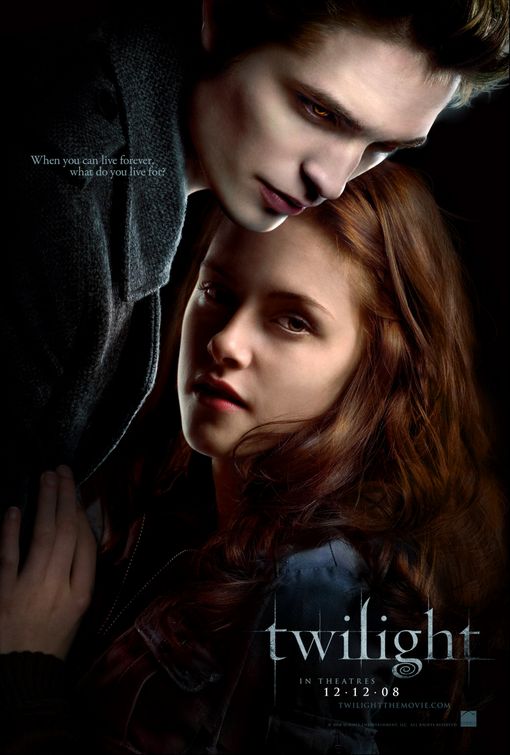
After Brian Fies' talk, I tried to think of other places where word and image work together.  As I was looking at my wall, I realized that I had many posters that were reflective of this.  Movie posters are examples of how word and image work together because they have an image that is supposed to represent the movie, but they also have words that give you a hint into what the movie is about and the title.  For example, for the movie Twilight, the movie poster has an image of "Edward" and "Bella", along with the words "When you can live forever, what do you live for?"  In this poster, the image has Edward standing protectively over Bella, and Bella is looking forwards and safely tucked under Edward.
As an image, the viewer is able to see that a boy seems to be standing protectively over a girl, but without the words, it is unclear what is really going on.  The statement "When you can live forever, what do you live for?" gives the viewer and hint that the boy standing over the girl is possibly the one that "lives forever" because the the image was made so the boy looks almost ethereal with very pale skin and glowing eyes.  The girl is hidden under the boy and she looks more normal and fragile, so from the statement, the viewer can deduce that the girl is the thing the boy will "live for".

How Word & Image Work Together

In Brian Fies' talk, he mentioned how word and image worked together in his comics.  In his comics, the words and images worked together so that the viewer would need both two understand the whole.  The story would be incomplete if the viewer only saw the picture, or only saw the words.
His book, Mom's Cancer, portrays the emotions that he and his family went through while watching helplessly as their mother battled cancer.  In his book, he was able to show images that illustrated the frustration and powerlessness they felt, while adding words to supplement and increase the feeling of the pictures.
Brian Fies also talked about his second book, Whatever Happened to the World of Tomorrow?  In this book, he created two pairs of characters: Pop and Buddy, and Cap Crater and the Cosmic Kid.  Buddy is a boy that loves to read comics about the superheros Cap Crater and the Cosmic Kid.  As the book progresses, the viewer discovers that the character of Pop and Cap Crater seem to mesh together while the characters of Buddy and the Cosmic Kid also seem to mesh together.  For the comics Buddy reads, Brian Fies used images and words that hinted at previous comics that had been published around the same time that the story was set in.

Monday, November 1, 2010

Design of Cars

In the film Objectified, Chris Bangle of BMW Group mentioned that cars are the statues of present day.  He argued that cars have a face and that car designers design their cars so that they look beautiful from all angles.  I think this was my favorite part of Objectified, because I am completely enamored of cars.  I love their smooth lines, beautiful angles, and their adorable "faces".  As a result, I am constantly looking at new innovations in car designs.

A few years ago, BMW came up with the "GINA" concept.  It stands for "Geometry and Functions in 'N' Adaptations", which, according to John Neff, "basically means that designers from both BMW and BMW Group DesignworksUSA were allowed to throw out the rulebook."  This concept caught my eye because it was so different from all other cars.  The outside of the car has a changeable "skin" that allows it to change shape based on electro-hydraulic devices.  The possibilities of a car with skin are endless.  One car could theoretically turn into many different cars, based on its ability to change shape.  At the same time, the car would have a "human-like" face that can close it's eyes during the day (no headlights), and open them at night (headlights).  It would also be able to open it's mouth (opening the hood) and similarly for the trunk of the car.
More recently, however, Audi came up with the "A’KIMONO LS2.0", which is based on the idea of cars being sculptures.  The designer created an artificial lighting system on the car to illuminate the car's body surfaces in the dark.  In this way, the car is able to highlight it's "sexy" body even in the dark so that it can be seen.  The designer, Teodor Kyuchukov said his "...main goal is to provoke people develop their own sense of seeing and perception. Applying various artistic methods and techniques allows creating individual lighting designs, through which the designer communicates with the audience." (carbodydesign)

How Form and Content Intersect in Objectified

In Gary Hustwit's film, Objectified, we are introduced to a very different view on the world.  From the beginning of the film, we are challenged to think of design in a new light as we are told that design is present in everyday life.  Starting at the beginning of our day, when we are woken up by our alarm clocks, until the end of the day, when we brush our teeth and get ready for bed, we are surrounded by design.  As Henry Ford said, "Every object has a story," and in Objectified, we are asked to think about how everyday objects came to be.
We are introduced to a California based design company named Smart Design, where they design objects based on the consumer needs.  By satisfying the extremes of the market, the athletes and the disabled, they are able to design products that can enhance the ergonomic properties of those objects.  With this mission, Smart Design becomes a good introduction for the companies and designers that follow, because they help highlight many of the ideas that those other companies and designers focus on.  For example, Jonathan Ive from Apple said when designing, it is important to have a hierarchy of what is important versus what isn't important.  He also said that designs should be simple so that it makes you think, of course it is like that, why would it be any different? These statements of Jonathan Ive are present in the products that Smart Design presents, because they focus on simple, smart, ergonomic designs that change the way people use these everyday tools without realizing it.
Aside from the objects that are presented, the film itself uses subtle techniques to highlight the people that are talking, or what they are talking about.  During the film, my friend pointed out that the backgrounds were often white, so that the objects or people that were being focused on stood out more.  After she mentioned this, I paid careful attention to the film's form.
Through the subtle presentation of objects and people on white, Gary Hustwit is able to create a background that shows us who or what is important in the frame.  The film's form intersects with the content of the film when the background highlights the object, and the camera is zoomed in to clearly focus on the object.  Through these techniques, Gary Hustwit presents a smart design that allows the viewer to follow what is happening effortlessly.

Why So Backwards?

In this new age of technology and innovations, why are some things still so backwards?  For example, this morning, when I went to school, I had to park at a meter.  I found myself plagued, however, by the dilemma that I had only three quarters out of the six I would need in order to lawfully park in the space during my class.  Luckily, I was let out of class early so that I was able to move my car before receiving a ticket.  The fact that I was short on quarters had me thinking, why so backwards, parking meter?  
Since this technological age practically begs people to get credit cards, why are parking meters still at the point where they need coins in order to operate?  Why not have parking meters that are designed so that you can insert credit cards, debit cards, or even just dollar bills?  I mean, don't get me wrong, I have encountered the kind of parking lots where there is a meter you go up to in order to pay for the allotted time you want to park, but why is this not present everywhere?  In the film Objectified, the designer Rarid Rashid challenged us to think about why in this technological age, we still have things that are so backwards.  He said there is no excuse for us being uncomfortable in chairs, because there are multiple designers that have designed millions of chairs.  In that case, why were public places so laden with uncomfortable areas to sit?  With all the numerous designs floating around, why are people still forced to accept hard, uncomfortable seats?  After all, he said, it wouldn't make sense for us to be in our homes with our laptops and cellphones, then go outside and saddle up our horse and carriage to travel.